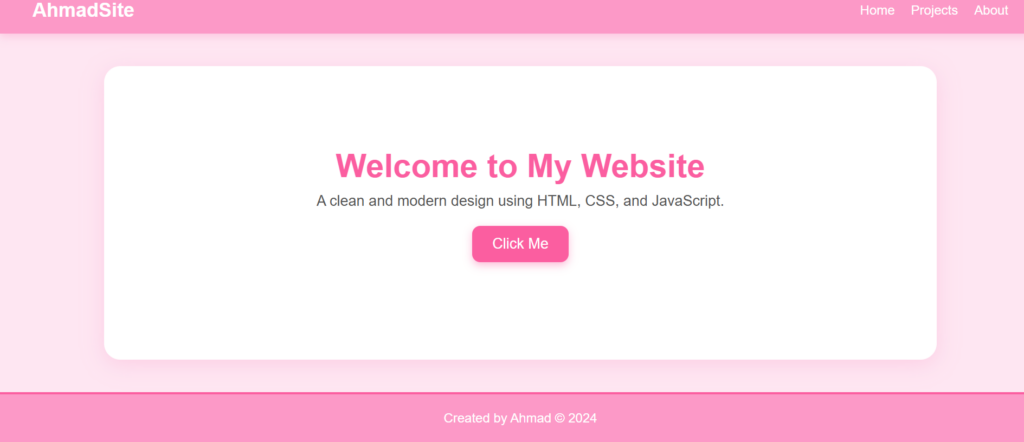
i made website called my class
here you can see
index.html
Welcome to My Website
A clean and modern design using HTML, CSS, and JavaScript.
here style.css
* {
    margin: 0;
    padding: 0;
    box-sizing: border-box;
}

body {
    font-family: "Poppins", sans-serif;
    background: #ffe6f2;
    color: #4a4a4a;
}


nav {
    display: flex;
    justify-content: space-between;
    align-items: center;
    padding: 15px 40px;
    background: #ff99c8;
    color: white;
    box-shadow: 0 4px 10px rgba(255, 153, 200, 0.4);
}

nav ul {
    display: flex;
    list-style: none;
}

nav ul li {
    margin-left: 20px;
}

nav ul li a {
    color: white;
    text-decoration: none;
    font-weight: 500;
}

.logo {
    font-size: 24px;
    font-weight: bold;
    color: white;
}


.hero {
    text-align: center;
    padding: 100px 20px;
    background: white;
    margin: 40px auto;
    width: 80%;
    border-radius: 20px;
    box-shadow: 0 6px 25px rgba(255, 153, 200, 0.3);
}

.hero h1 {
    font-size: 40px;
    margin-bottom: 10px;
    color: #ff5fa2;
}

.hero p {
    font-size: 18px;
    margin-bottom: 20px;
    color: #555;
}


button {
    padding: 12px 25px;
    font-size: 18px;
    background: #ff5fa2;
    color: white;
    border: none;
    border-radius: 10px;
    cursor: pointer;
    transition: 0.3s;
    box-shadow: 0 4px 10px rgba(255, 95, 162, 0.4);
}

button:hover {
    background: #e14f8f;
    transform: scale(1.07);
}


footer {
    text-align: center;
    padding: 20px;
    margin-top: 40px;
    background: #ff99c8;
    color: white;
    border-top: 3px solid #ff5fa2;
}
here app.js
document.getElementById("myButton").addEventListener("click", () => {
    const message = document.getElementById("message");
    message.textContent = "You clicked it! Pink theme activated.";
    message.style.color = "#ff5fa2";
    message.style.fontWeight = "bold";
});