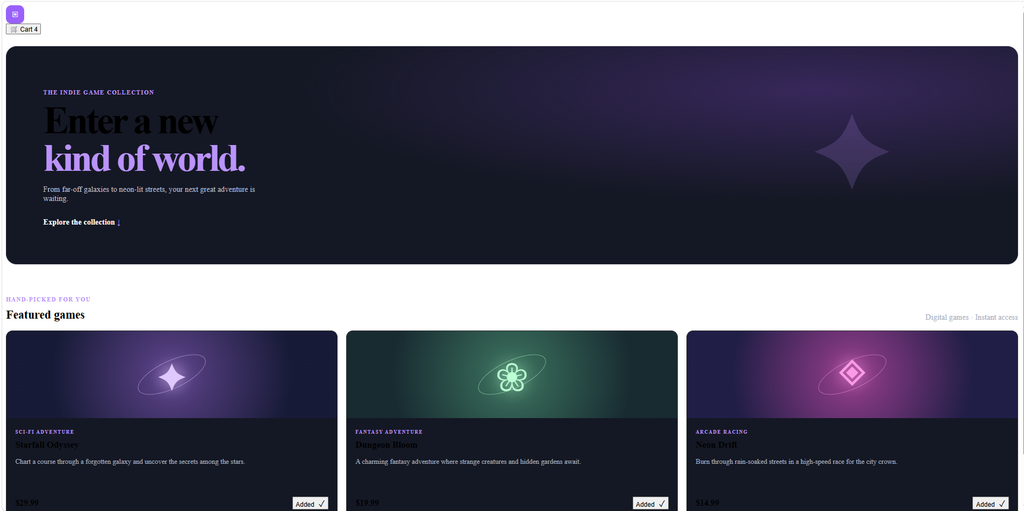
so i made a website that can use to sell games
I got some help from gogle a little bit down here you can see index.html
<!DOCTYPE html>
<html lang="en">
<head>
  <meta charset="UTF-8">
  <meta name="viewport" content="width=device-width, initial-scale=1">
  <meta name="theme-color" content="#0b0d14">
  <meta name="description" content="Discover your next favorite indie game at Pixel Vault.">
  <title>Pixel Vault — Find Your Next Favorite Game</title>
  <link rel="stylesheet" href="style.css">
</head>

<body>
  <header>
    <a class="brand" href="#" aria-label="Pixel Vault home">
      <span class="brand-icon" aria-hidden="true">▣</span>
      <h1>Pixel Vault</h1>
    </a>

    <button id="cart-button" type="button" aria-haspopup="dialog">
      🛒 Cart <span class="cart-count" id="count" aria-live="polite">0</span>
    </button>
  </header>

  <main>
    <section class="hero">
      <p class="eyebrow">THE INDIE GAME COLLECTION</p>
      <h2>Enter a new<br><span>kind of world.</span></h2>
      <p class="hero-copy">
        From far-off galaxies to neon-lit streets, your next great adventure
        is waiting.
      </p>
      <a class="hero-link" href="#featured">Explore the collection <span aria-hidden="true">↓</span></a>
      <div class="hero-decoration" aria-hidden="true">✦</div>
    </section>

    <section class="collection" id="featured" aria-labelledby="games-heading">
      <div class="section-heading">
        <div>
          <p class="eyebrow">HAND-PICKED FOR YOU</p>
          <h2 id="games-heading">Featured games</h2>
        </div>
        <span class="collection-note">Digital games · Instant access</span>
      </div>

      <div id="games" class="games-grid"></div>
    </section>
  </main>

  <footer>
    <p>© 2025 Pixel Vault <span>·</span> Good games. Great escapes.</p>
  </footer>

  <dialog id="cart" aria-labelledby="cart-heading">
    <div class="cart-header">
      <h2 id="cart-heading">Your cart</h2>
      <button id="close-cart" class="close-button" type="button" aria-label="Close cart">×</button>
    </div>

    <div id="items" aria-live="polite"></div>

    <div class="cart-total">
      <span>Total</span>
      <strong>$<span id="total">0.00</span></strong>
    </div>

    <div class="cart-actions">
      <button id="checkout" type="button">Checkout</button>
    </div>
    <p class="cart-note">Secure checkout · Digital delivery</p>
  </dialog>

  <script>
    const games = [
      {
        name: "Starfall Odyssey",
        description: "Chart a course through a forgotten galaxy and uncover the secrets among the stars.",
        genre: "SCI-FI ADVENTURE",
        price: 29.99,
        icon: "✦",
        art: "starfall"
      },
      {
        name: "Dungeon Bloom",
        description: "A charming fantasy adventure where strange creatures and hidden gardens await.",
        genre: "FANTASY ADVENTURE",
        price: 19.99,
        icon: "❀",
        art: "dungeon"
      },
      {
        name: "Neon Drift",
        description: "Burn through rain-soaked streets in a high-speed race for the city crown.",
        genre: "ARCADE RACING",
        price: 14.99,
        icon: "◈",
        art: "neon"
      }
    ];

    const basket = {};
    const gamesDiv = document.getElementById("games");
    const countEl = document.getElementById("count");
    const cartDialog = document.getElementById("cart");
    const itemsEl = document.getElementById("items");
    const totalEl = document.getElementById("total");
    const checkoutButton = document.getElementById("checkout");

    const money = amount => amount.toFixed(2);

    games.forEach((game, index) => {
      const card = document.createElement("article");
      card.className = "game-card";

      card.innerHTML = `
        <div class="game-art ${game.art}" aria-hidden="true">
          <span>${game.icon}</span>
          <span class="art-orbit"></span>
        </div>
        <div class="game-info">
          <span class="game-genre">${game.genre}</span>
          <h3>${game.name}</h3>
          <p class="game-description">${game.description}</p>
          <div class="game-footer">
            <span class="game-price">$${money(game.price)}</span>
            <button class="add-button" type="button">Add to cart <span aria-hidden="true">+</span></button>
          </div>
        </div>
      `;

      card.querySelector(".add-button").addEventListener("click", event => {
        addToCart(index);
        event.currentTarget.innerHTML = "Added <span aria-hidden='true'>✓</span>";
        window.setTimeout(() => {
          event.currentTarget.innerHTML = "Add to cart <span aria-hidden='true'>+</span>";
        }, 900);
      });

      gamesDiv.appendChild(card);
    });

    function addToCart(index) {
      basket[index] = (basket[index] || 0) + 1;
      updateCount();
    }

    function updateCount() {
      countEl.textContent = Object.values(basket)
        .reduce((sum, quantity) => sum + quantity, 0);
    }

    function showCart() {
      const entries = Object.entries(basket);

      if (entries.length === 0) {
        itemsEl.innerHTML = '<p class="empty-cart">Your cart is empty. Your next adventure is just a click away.</p>';
      } else {
        itemsEl.innerHTML = entries.map(([index, quantity]) => {
          const game = games[index];
          return `
            <div class="cart-item">
              <div>
                <strong>${game.name}</strong>
                <p>$${money(game.price)} each</p>
              </div>
              <div class="quantity-controls">
                <button type="button" data-change="${index}" data-amount="-1" aria-label="Remove one ${game.name}">−</button>
                <span>${quantity}</span>
                <button type="button" data-change="${index}" data-amount="1" aria-label="Add one ${game.name}">+</button>
                <strong>$${money(game.price * quantity)}</strong>
              </div>
            </div>
          `;
        }).join("");
      }

      const total = entries.reduce(
        (sum, [index, quantity]) => sum + games[index].price * quantity,
        0
      );

      totalEl.textContent = money(total);
      checkoutButton.disabled = entries.length === 0;
      cartDialog.showModal();
    }

    itemsEl.addEventListener("click", event => {
      const button = event.target.closest("[data-change]");
      if (!button) return;

      const index = button.dataset.change;
      basket[index] += Number(button.dataset.amount);

      if (basket[index] <= 0) delete basket[index];

      updateCount();
      showCart();
    });

    document.getElementById("cart-button").addEventListener("click", showCart);
    document.getElementById("close-cart").addEventListener("click", () => cartDialog.close());

    cartDialog.addEventListener("click", event => {
      if (event.target === cartDialog) cartDialog.close();
    });

    checkoutButton.addEventListener("click", () => {
      alert("Demo checkout only. Connect a payment provider to accept real payments.");
    });
  </script>
</body>
</html>
after index.html down here will be style.css
.brand {
  display: flex;
  align-items: center;
  gap: 10px;
  color: white;
  text-decoration: none;
}

.brand h1 { margin: 0; }

.brand-icon {
  display: grid;
  width: 38px;
  height: 38px;
  place-items: center;
  border-radius: 11px;
  background: #9b5cff;
}

.hero {
  position: relative;
  overflow: hidden;
  margin: 24px 0 54px;
  padding: clamp(32px, 7vw, 76px);
  border: 1px solid #33304a;
  border-radius: 22px;
  background: radial-gradient(ellipse at 80% 20%, #38265c, transparent 45%), #141824;
}

.eyebrow, .game-genre {
  color: #bd91ff;
  font-size: .75rem;
  font-weight: bold;
  letter-spacing: .14em;
}

.hero h2 {
  margin: 12px 0;
  font-size: clamp(2.5rem, 7vw, 5rem);
  line-height: .98;
  letter-spacing: -.06em;
}

.hero h2 span { color: #bd91ff; }
.hero-copy { max-width: 450px; color: #b7bbca; }

.hero-link {
  display: inline-block;
  margin-top: 14px;
  color: white;
  font-weight: bold;
  text-decoration: none;
}

.hero-link span { color: #bd91ff; }

.hero-decoration {
  position: absolute;
  top: 12%;
  right: 12%;
  color: #bd91ff;
  font-size: clamp(6rem, 20vw, 14rem);
  opacity: .18;
}

.section-heading {
  display: flex;
  align-items: end;
  justify-content: space-between;
  gap: 16px;
  margin-bottom: 18px;
}

.section-heading h2 { margin: 4px 0 0; }
.collection-note, footer { color: #a7adbd; }

.games-grid {
  display: grid;
  grid-template-columns: repeat(auto-fit, minmax(240px, 1fr));
  gap: 18px;
}

.game-card {
  overflow: hidden;
  border: 1px solid #333;
  border-radius: 14px;
  background: #141824;
  transition: transform .2s, border-color .2s;
}

.game-card:hover {
  transform: translateY(-4px);
  border-color: #9b5cff;
}

.game-art {
  position: relative;
  display: grid;
  height: 180px;
  overflow: hidden;
  place-items: center;
}

.game-art > span:first-child {
  z-index: 1;
  font-size: 5rem;
  text-shadow: 0 0 35px currentColor;
}

.starfall { color: #dfc7ff; background: radial-gradient(circle, #60428e, #171a38 70%); }
.dungeon { color: #b8ffd1; background: radial-gradient(circle, #39745e, #172b32 70%); }
.neon { color: #ff9be7; background: radial-gradient(circle, #9a3d8f, #211d48 70%); }

.art-orbit {
  position: absolute;
  width: 150px;
  height: 55px;
  border: 1px solid currentColor;
  border-radius: 50%;
  opacity: .5;
  transform: rotate(-25deg);
}

.game-info { padding: 18px; }
.game-genre { font-size: .65rem; }
.game-info h3 { margin: 8px 0; }
.game-description { min-height: 66px; color: #a7adbd; font-size: .9rem; }

.game-footer, .cart-total, .cart-item, .quantity-controls {
  display: flex;
  align-items: center;
  justify-content: space-between;
  gap: 10px;
}

.game-price { font-size: 1.1rem; font-weight: bold; }

.add-button span { margin-left: 5px; font-size: 1.1rem; }

footer {
  padding: 20px 7%;
  text-align: center;
  font-size: .85rem;
}

dialog {
  width: min(480px, calc(100% - 32px));
  color: white;
  background: #141824;
}

dialog::backdrop { background: rgb(0 0 0 / 70%); backdrop-filter: blur(3px); }

.cart-header, .cart-total {
  display: flex;
  align-items: center;
  justify-content: space-between;
}

.close-button {
  padding: 4px 10px;
  background: #292e3d;
  font-size: 1.3rem;
}

.cart-item {
  padding: 14px 0;
  border-bottom: 1px solid #333;
}

.cart-item p, .cart-note { margin: 4px 0 0; color: #a7adbd; font-size: .85rem; }

.quantity-controls button {
  padding: 5px 9px;
  background: #292e3d;
}

.cart-total { padding: 16px 0; }
.cart-actions button { width: 100%; }
.cart-note { text-align: center; }
.empty-cart { color: #a7adbd; text-align: center; }

button:disabled { cursor: not-allowed; opacity: .5; }

@media (max-width: 600px) {
  .section-heading { align-items: start; flex-direction: column; }
  .hero { margin-top: 16px; }
  .cart-item { align-items: start; flex-direction: column; }
}
here you can see how it look like
hope you like it