
Designed with WordPress
On this day i decided to sharpen up on css so i worked on a project of designing piano keys using div elements with key classes. This was a simple effective lesson that helped me understand css better and how to use it. i will include photos below
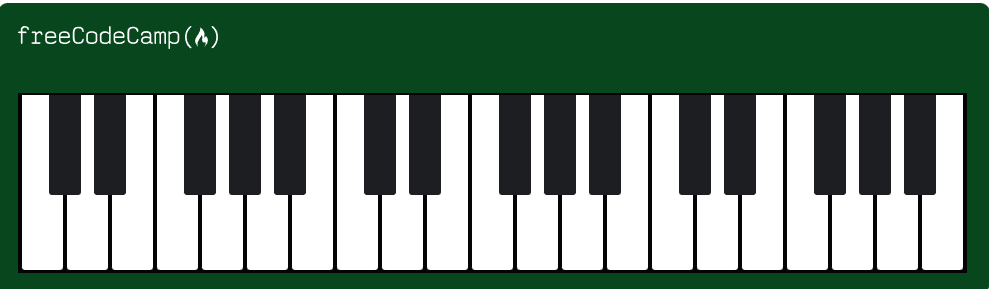
the code that i used on the html side goes as follows
<body>
    <div id="piano">
      <img class="logo" src="https://cdn.freecodecamp.org/platform/universal/fcc_primary.svg" alt="freeCodeCamp Logo" />
      <div class="keys">
</body>
and on the css side
html {
  box-sizing: border-box;
}

*, *::before, *::after {
  box-sizing: inherit;
}

#piano {
  background-color: #00471b;
  width: 992px;
  height: 290px;
  margin: 80px auto;
  padding: 90px 20px 0 20px;
  position: relative;
  border-radius: 10px;
}

.keys {
  background-color: #040404;
  width: 949px;
  height: 180px;
  padding-left: 2px;
  overflow: hidden;
}

.key {
  background-color: #ffffff;
  position: relative;
  width: 41px;
  height: 175px;
  margin: 2px;
  float: left;
  border-radius: 0 0 3px 3px;
}

.key.black--key::after {
  background-color: #1d1e22;
  content: "";
  position: absolute;
  left: -18px;
  width: 32px;
  height: 100px;
  border-radius: 0 0 3px 3px;
}

.logo {
  width: 200px;
  position: absolute;
  top: 23px;
}

@media (max-width: 768px) {
  #piano {
    width: 358px;
  }

  .keys {
    width: 318px;
  }

  .logo {
    width: 150px;
  }
}
thankyou very much
Leave a Reply