
Proudly powered by WordPress
today i designed a parent teacher conference form using html and css today my plan was make clear input fields so parents and teachers can easily provide information such as contact name and info things of that sort. Using CSS helped me to create a clean and organized layout with readable labels spacing and subtle visual cues that guide users through the form using a thoughtful design choice like grouping related sections help make the form easy to use and accessible to all users i will add photos and code below
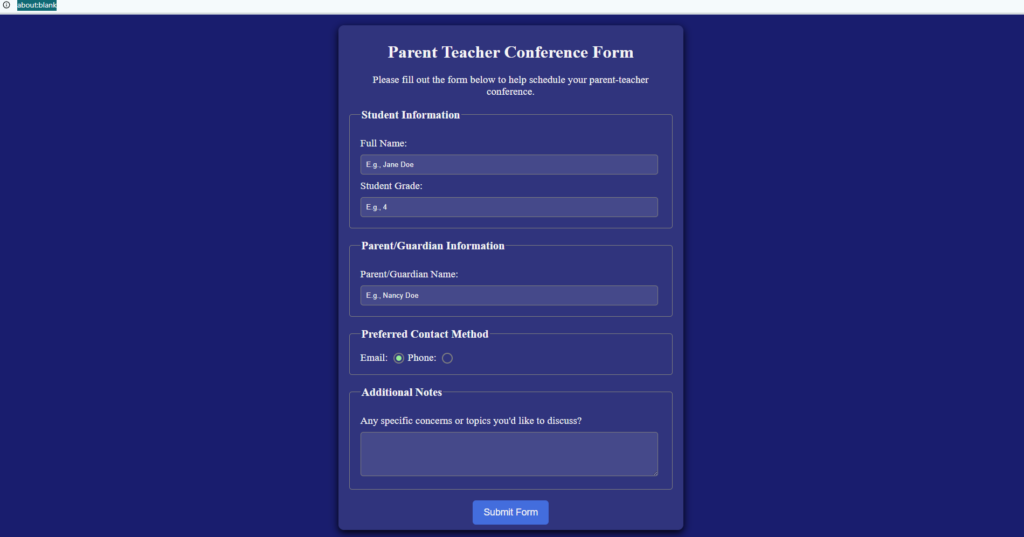
<form>, <fieldset>, <legend>main elements i used to code
body {
  background-color: MidnightBlue;
  color: whitesmoke;
}

.container {
    background-color: #ffffff1a;
    width: 80%;
    max-width: 600px;
    border-radius: 10px;
    margin: 20px auto;
    padding: 10px 20px;
    box-shadow: 0 5px 15px black;
}

.center {
  text-align: center;
}

.description {
  font-size: 1.2rem;
}

fieldset {
  border: 1px solid gray;
  border-radius: 5px;
  margin: 20px 0;
  padding: 20px;
}

fieldset legend {
  font-size: 1.3rem;
  font-weight: 600;
}

label {
  font-size: 1.2rem;
}

label:not(.contact-method) {
  display: block;
  margin: 10px 0;
}

input:not(.contact-method-radio-btn),
textarea {
  background-color: #ffffff1a;
  width: 95%;
  border: 1px solid gray;
  border-radius: 5px;
  padding: 10px;
}

input,
input::placeholder,
textarea {
  color: whitesmoke;
}


.contact-method-radio-btn {
  appearance: none;
  width: 20px;
  height: 20px;
  border-radius: 50%;
  border: 2px solid gray;
  vertical-align: bottom;
}

.contact-method-radio-btn::before {
  display: block;
  content: " ";
  width: 10px;
  height: 10px;
  border-radius: 50%;
  transform: translate(3px, 3px) scale(0);
  transition: all 0.3s ease-in;
}

.contact-method-radio-btn:checked::before {
  transform: translate(3px, 3px) scale(1);
  background-color: lightgreen;
}

.submit-btn {
  cursor: pointer;
  background-color: royalblue;
  color: whitesmoke;
  border: none;
  border-radius: 6px;
  padding: 12px 20px;
  font-size: 1.1rem;
  display: block;
  margin: auto;
}
all of the css that was used for the project
About
Privacy
Social
Designed with WordPress
Leave a Reply