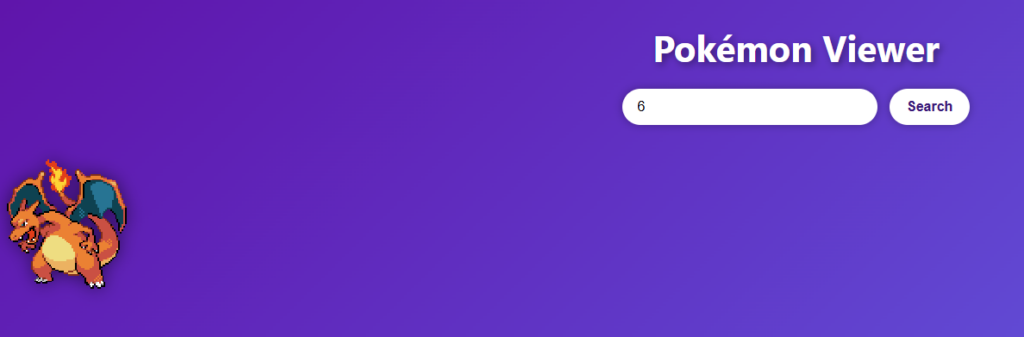
what i did today was make a pokemon website where you can look up all the pokemon and if you type all it will show all the pokemon in order in the pokedex and if you scroll it changes color if you want you make
.pokeBox:hover {
      transform: translateY(-5px);
      box-shadow: 0 0 18px rgba(0,0,0,0.5);
    }
<!DOCTYPE html>
<html lang=”en”>
<head>
<meta charset=”UTF-8″>
<title>Pokémon Viewer</title>
<link rel=”stylesheet” href=”styles.css”>
<style>
body {
font-family: “Segoe UI”, Arial, sans-serif;
text-align: center;
margin: 0;
padding: 20px;
background: linear-gradient(135deg, #6104ad, #6473f6);
min-height: 100vh;
color: white;
}
h1 {
font-size: 42px;
text-shadow: 3px 3px 8px rgba(0,0,0,0.4);
margin-bottom: 20px;
}
/* Search bar + button */
#pokemonName {
padding: 12px 18px;
width: 260px;
border-radius: 25px;
border: none;
outline: none;
font-size: 16px;
box-shadow: 0 0 10px rgba(0,0,0,0.3);
}
button {
padding: 12px 20px;
margin-left: 10px;
border: none;
border-radius: 25px;
background: #ffffff;
color: #3a147b;
font-size: 16px;
font-weight: bold;
cursor: pointer;
transition: 0.2s;
box-shadow: 0 0 10px rgba(0,0,0,0.3);
}
button:hover {
background: #ae7ed0;
transform: scale(1.05);
}
/* Single Pokémon */
#pokemonSprite {
display: none;
margin-top: 25px;
width: 180px;
image-rendering: pixelated;
filter: drop-shadow(0 0 10px rgba(0,0,0,0.5));
}
/* All Pokémon grid */
#allContainer {
display: none;
margin-top: 40px;
display: grid;
grid-template-columns: repeat(auto-fill, minmax(140px, 1fr));
gap: 25px;
padding: 10px;
max-width: 1100px;
margin-left: auto;
margin-right: auto;
}
/* Pokémon card */
.pokeBox {
background: rgba(255,255,255,0.2);
padding: 15px;
border-radius: 15px;
backdrop-filter: blur(6px);
box-shadow: 0 0 12px rgba(0,0,0,0.3);
transition: 0.2s;
}
.pokeBox:hover {
transform: translateY(-5px);
box-shadow: 0 0 18px rgba(0,0,0,0.5);
}
.pokeBox img {
width: 96px;
image-rendering: pixelated;
filter: drop-shadow(0 0 6px rgba(0,0,0,0.4));
}
.pokeBox div {
margin-top: 8px;
font-size: 16px;
font-weight: bold;
text-transform: capitalize;
color: #9dbd10;
text-shadow: 2px 2px 5px rgba(0,0,0,0.5);
}
</style>
</head>
<body>
<h1>Pokémon Viewer</h1>
<input type=”text” id=”pokemonName” placeholder=”Enter Pokémon name (e.g. pikachu or all)” />
<button onclick=”fetchData()”>Search</button>
<div>
<img id=”pokemonSprite” alt=”Pokémon sprite” />
</div>
<div id=”allContainer”></div>
<script>
async function fetchData() {
const input = document.getElementById(“pokemonName”).value.toLowerCase();
const singleImg = document.getElementById(“pokemonSprite”);
const allContainer = document.getElementById(“allContainer”);
singleImg.style.display = “none”;
allContainer.style.display = “none”;
allContainer.innerHTML = “”;
if (input === “all”) {
loadAllPokemon();
return;
}
try {
const response = await fetch(`https://pokeapi.co/api/v2/pokemon/${input}`);
if (!response.ok) throw new Error(“Not found”);
const data = await response.json();
singleImg.src = data.sprites.front_default;
singleImg.style.display = “block”;
} catch (error) {
alert(“Could not fetch that Pokémon. Check the name and try again.”);
}
}
async function loadAllPokemon() {
const allContainer = document.getElementById(“allContainer”);
allContainer.style.display = “grid”;
try {
const listRes = await fetch(“https://pokeapi.co/api/v2/pokemon?limit=1025”);
const listData = await listRes.json();
for (const pokemon of listData.results) {
const res = await fetch(pokemon.url);
const data = await res.json();
const box = document.createElement(“div”);
box.className = “pokeBox”;
const img = document.createElement(“img”);
img.src = data.sprites.front_default;
const label = document.createElement(“div”);
label.textContent = data.name;
box.appendChild(img);
box.appendChild(label);
allContainer.appendChild(box);
}
} catch (err) {
alert(“Error loading all Pokémon.”);
}
}
</script>
<div id=”statsOverlay” style=”
position: fixed; top:0; left:0; width:100%; height:100%;
background: rgba(0,0,0,0.6); display:none;
justify-content:center; align-items:center;”>
<div style=”
background:white; color:black; padding:25px; width:320px;
border-radius:15px; text-align:center;”>
<h2 id=”statsName”></h2>
<div id=”statsList”></div>
<button onclick=”closeStats()” style=”
margin-top:15px; padding:8px 15px; border:none;
background:#ff4444; color:white; border-radius:8px; cursor:pointer;”>
Close
</button>
</div>
</div>
<div id=”searchStack”></div>
</body>
</html>
Leave a Reply